
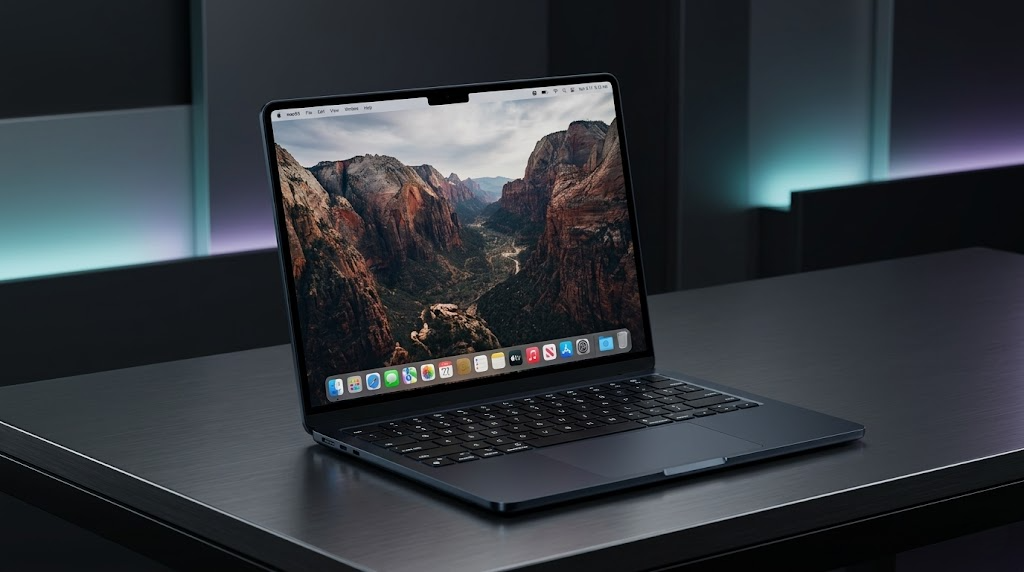
MacBook Air M2 At a Glance
Perfect for office work, remote work, online classes, writing, presentations, browsing, and daily productivity.
Heavy 3D workloads, AAA gaming, and advanced editing workflows are better handled by MacBook Pro models.
Even after years on the market, battery life remains one of the biggest reasons people continue buying this laptop.
Key Specifications
Design & Build Quality
The MacBook Air M2 still looks modern in 2026. Apple’s flat-edge redesign aged extremely well, and honestly, many Windows ultrabooks still feel less refined despite newer hardware.
The aluminum chassis feels dense, premium, and sturdy without becoming heavy. If you constantly move between coffee shops, schools, offices, or airports, this laptop remains incredibly convenient.
It slides easily into backpacks, barely adds weight during daily commutes, and never feels bulky while working in tight spaces like cafes or public transport.
Display Experience
The 13.6-inch Liquid Retina display continues to be one of the MacBook Air M2’s strongest features. Colors look vibrant without feeling oversaturated, text appears razor sharp, and brightness remains strong enough for most indoor and outdoor situations.
Watching Netflix, editing photos, reading documents, and browsing websites still feel premium. The thin bezels also make the screen look larger than older MacBook Air generations.
Movies, YouTube videos, and social media content look crisp and colorful.
Long hours of writing and reading feel comfortable thanks to sharp rendering.
Scrolling is smooth, but premium competitors now offer higher refresh rates.
Performance in 2026
Daily Tasks
For web browsing, office work, Google Docs, Zoom calls, multitasking, and media consumption, the MacBook Air M2 still feels extremely fast. Apps launch instantly, macOS remains smooth, and performance rarely feels sluggish.
Creative Work
Light photo editing, short-form video editing, Canva work, and social media content creation remain perfectly manageable. However, sustained heavy rendering eventually exposes the fanless thermal limitations.
Gaming
Gaming is still not the MacBook Air’s strongest category. Casual Apple Arcade titles run well, but demanding AAA games can quickly push thermals and battery consumption higher.
Thermals & Fanless Experience
The fanless design remains both a strength and weakness. For daily productivity, silence is amazing. No fan noise during meetings, writing sessions, or late-night work feels luxurious. But under extended workloads like exporting 4K videos or large batch edits, performance can throttle compared to actively cooled laptops.
Battery Life Still Feels Unreal
This is still one of the best battery laptops you can buy in 2026.
For students and professionals in the Philippines dealing with long commutes, unstable charging situations, brownouts, or full-day classes, the MacBook Air M2 remains incredibly dependable. You can comfortably survive a full workday without panic-charging.
Keyboard, Trackpad & Speakers
Keyboard
Typing still feels fantastic. Key travel is comfortable, spacing is excellent, and long writing sessions remain easy even without an external keyboard.
Trackpad
Still arguably the best laptop trackpad in the industry. Gesture navigation on macOS remains smooth and extremely intuitive.
Speakers
Speaker quality remains shockingly good for such a thin laptop. Audio sounds full, clean, and louder than many Windows competitors.
Pros & Cons
What I Loved
- Excellent battery life
- Premium lightweight build
- Fantastic keyboard and trackpad
- Silent fanless design
- Still powerful for everyday use
- Outstanding portability
- Great display quality
Things You Should Know
- Base storage still feels limiting
- No high refresh rate display
- Thermal throttling under heavy loads
- Limited ports remain annoying
- Gaming support still weak
- Upgrades are expensive
Should You Buy It Instead of Newer Models?
| Model | Best Feature | Weakness | Who It’s For |
|---|---|---|---|
| MacBook Air M2 | Best value balance | Limited ports | Most everyday users |
| MacBook Air M3 | Faster graphics | Higher pricing | Buyers wanting newer chip efficiency |
| MacBook Pro | Pro-level performance | Much more expensive | Advanced creators |
Who Should Buy the MacBook Air M2 in 2026?
Buy It If…
- You want reliable all-day battery life
- You prioritize portability
- You mainly do productivity work
- You want a premium laptop experience
- You prefer macOS ecosystem integration
Skip It If…
- You need serious gaming performance
- You constantly render heavy 4K projects
- You require many physical ports
- You want high refresh rate displays
- You need upgradeable hardware
Frequently Asked Questions
Is the MacBook Air M2 still worth buying in 2026?
Yes. For everyday users, students, professionals, and casual creators, it still offers an excellent balance of performance, battery life, portability, and premium build quality.
Can it handle video editing?
Yes, especially for light to moderate editing workloads. However, professional creators handling heavy sustained projects may benefit more from a MacBook Pro.
Does the fanless design overheat?
For normal daily tasks, temperatures remain very manageable. Under prolonged heavy workloads, the laptop can become warm and reduce performance slightly to control heat.
Final Verdict
The MacBook Air M2 surviving this well into 2026 says a lot about how far ahead Apple was when it launched this machine.
It is not the newest laptop anymore. It is not the most powerful. It is not the best gaming machine. But for most people, none of that actually matters.
What matters is whether a laptop feels reliable, fast, lightweight, quiet, and easy to live with every single day. The MacBook Air M2 still absolutely nails those fundamentals.
Disclaimer: Images used in this article are for illustrative purposes only. All photos belong to their respective owners. If you are the copyright holder of any image and wish to request removal or credit update, please contact us.
Related Posts
Starlink in the Philippines: 1 Year Later—Is it Better than Fiber?
Long-Term Review Starlink in the Philippines: 1 Year Later—Is it Better than Fiber? After twelve full months of weathering heavy…
Is the Xiaomi 17T Worth Your Money? A Practical Review
Xiaomi 17T Review Is the Xiaomi 17T Worth Your Money? A Practical Review The Xiaomi 17T enters one of the…

Are Smartwatches Worth It for Filipinos in 2025? Pros and Cons
Smartwatches have come a long way since their early days of just showing notifications and counting steps. In 2025, they’re…